How to Find Untapped App Store Keywords With Our Free ASO Tool
Most app developers pick their keywords once, set them, and forget them. Meanwhile, their competitors are ranking for dozens of keywords they've never even considered. We built the ASO Keyword Suggestions tool to fix that. It's free, requires no signup, and works for both iOS and Android apps. Here's how to use it.
Step 1: Search for Your App
Head to the tool and type your app's name into the search bar. An autocomplete dropdown pulls results directly from the App Store or Google Play, toggle between platforms using the iOS/Android switch at the top.
Select your app from the dropdown and hit Analyze.
Step 2: Review Your Keyword Suggestions
The tool finds up to 10 competitors in your category, extracts keywords from their titles, subtitles, and descriptions, and scores each keyword by how many competitors use it versus whether you already do.
The Suggestions tab ranks keywords by opportunity score. Keywords marked NEW are ones your competitors use that you don't, these are your biggest opportunities. The score bar shows how strongly a keyword signals competitive relevance: the more competitors using it, the higher the score.
Step 3: Audit Your Current Keywords
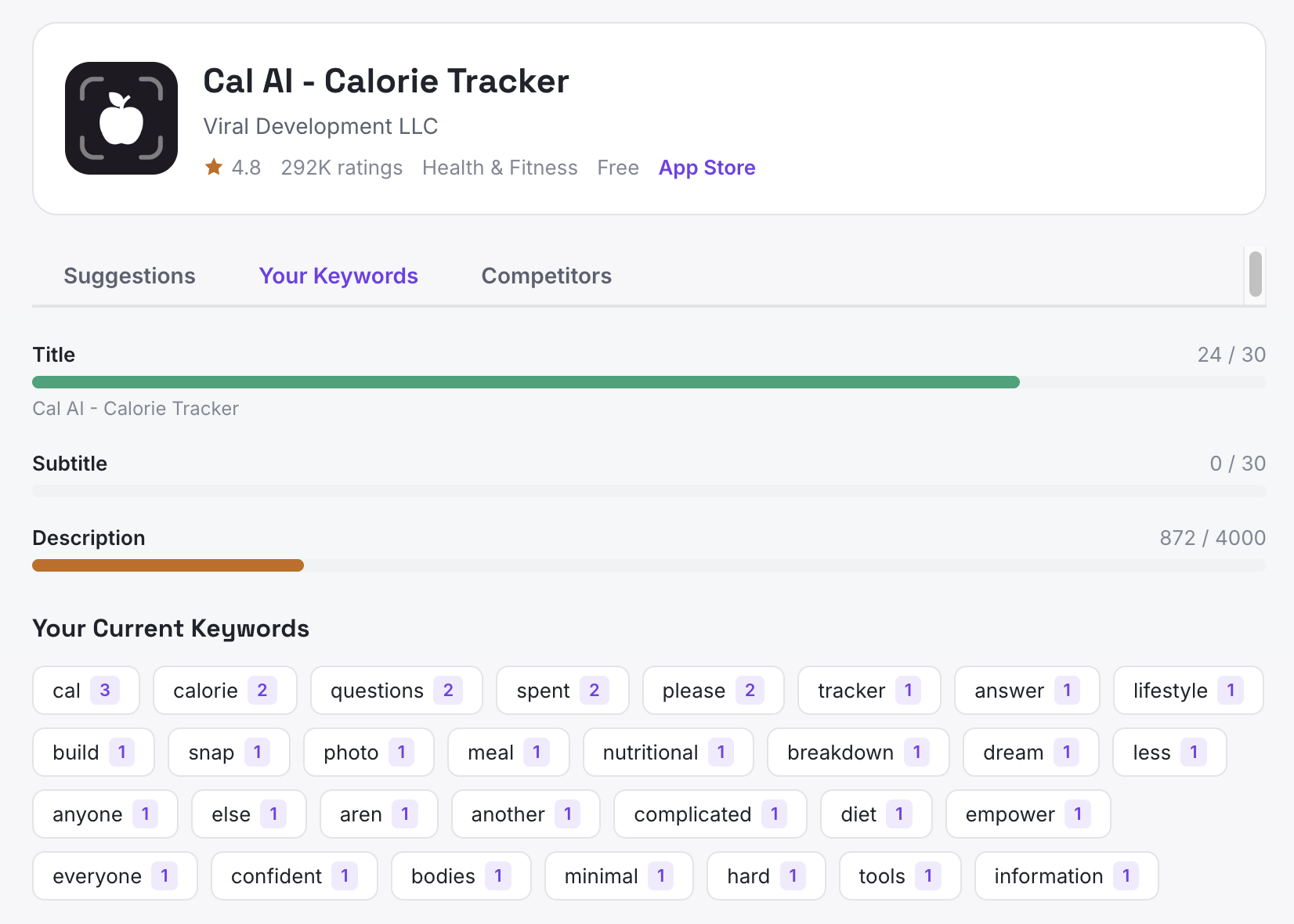
Switch to the Your Keywords tab to see what you're already working with. Three character meters show how much of your title, subtitle, and description limits you're actually using:
- Title: 30 characters max. If you're under 20, you're leaving discoverability on the table.
- Subtitle (iOS only): Another 30 characters of indexed, searchable real estate. Many developers leave this blank entirely.
- Description: Longer, keyword-rich descriptions rank better. Aim for 2,000+ characters.
Below the meters, you'll see your current keywords extracted as pills with frequency counts, a quick gut check on what the App Store "sees" when it indexes your listing.
Step 4: Study the Competitor Matrix
The Competitors tab shows a matrix of your top suggested keywords against each competitor. Checkmarks indicate which competitor uses which keyword. This view makes it easy to spot patterns: if 7 out of 10 competitors use a keyword and you don't, that's a clear gap.
Step 5: Apply the Optimization Tips
At the bottom of your results, the tool generates actionable tips based on your specific listing. These might include:
- Unused character space in your title or subtitle
- High-value keywords your competitors use that you're missing
- Multi-word phrases with less competition that you should consider
What to Do Next
Use the suggestions to update your App Store Connect or Google Play Console listing. Focus on the NEW keywords with the highest opportunity scores first. Revisit the tool periodically, competitor keywords shift as apps update their listings.
For deeper analysis, including review sentiment, churn risk detection, and competitive positioning across 35,000+ apps, try App Vulture's AI chat.
Built by App Vulture, the AI-powered App Store intelligence platform.