How to Check Where Any App Ranks in the App Store and Google Play
You just shipped an update, ran a promo campaign, or got featured by Apple. The first question is always the same: where does my app actually rank right now? We built the App Store Ranking Checker so you can answer that in seconds. It's free, requires no signup, and works for both iOS and Android. Here's how to use it.
Step 1: Search for Any App
Head to the tool and type an app name into the search bar. The autocomplete pulls results directly from the App Store or Google Play, toggle between platforms using the iOS/Android switch at the top.
Select your app from the dropdown and hit Check.
Step 2: Read Your Chart Rankings
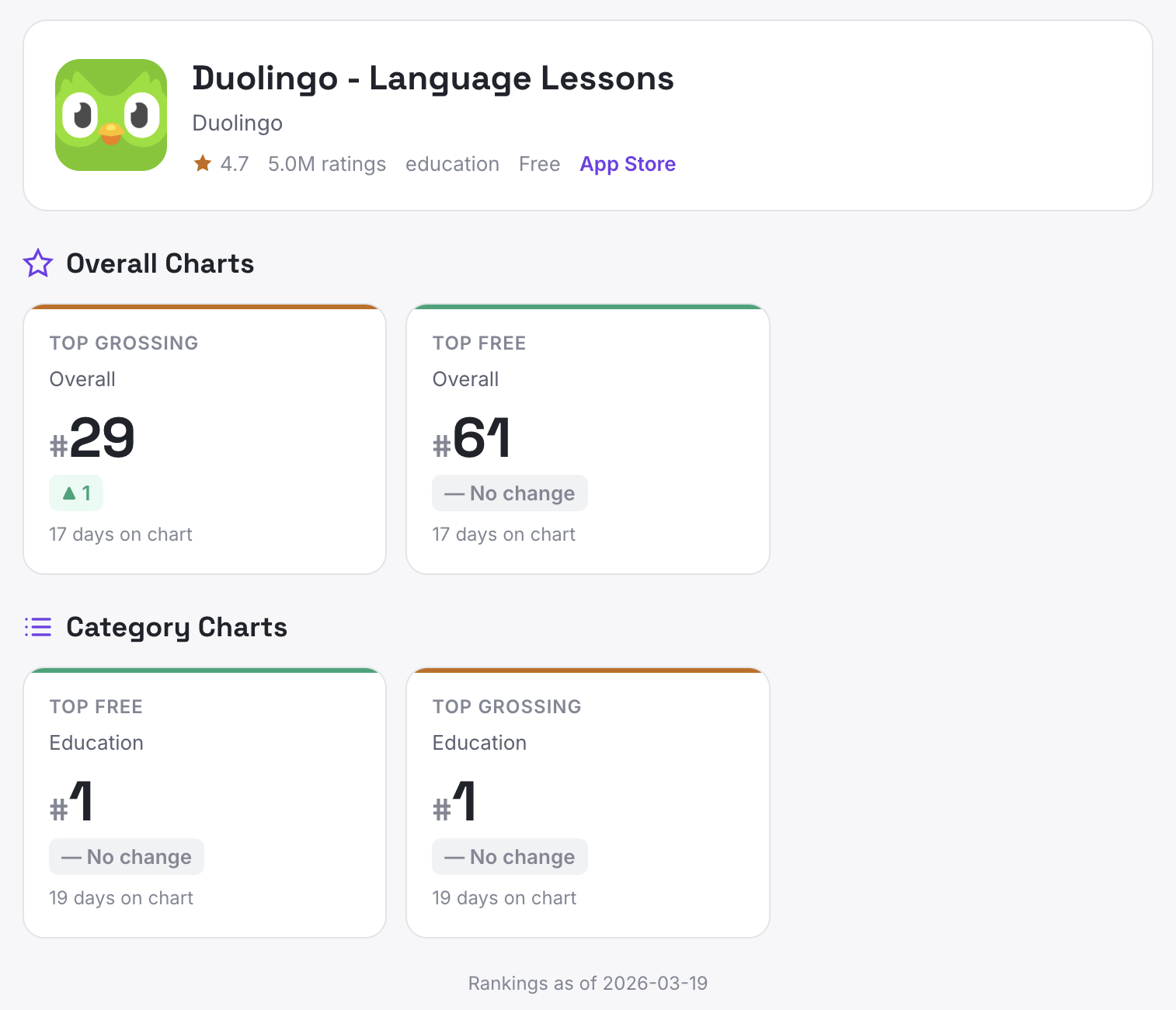
The tool checks our daily chart data (top 200 across all chart types and categories) and shows every chart your app currently appears on. Results are grouped into two sections:
- Overall Charts: Your rank on the main Top Free, Top Paid, or Top Grossing lists across the entire store.
- Category Charts: Your rank within specific categories like Education, Health & Fitness, or Productivity.
Each card shows your current rank, the chart type (Free, Paid, or Grossing), and how many days you've been on that chart.
Step 3: Track Rank Changes
Every chart card includes a rank change indicator showing movement since the previous day:
- Green arrow up: You climbed in the rankings.
- Red arrow down: You dropped.
- Dash: No change.
- NEW: You just entered this chart.
This makes it easy to spot whether a campaign, feature, or update is actually moving the needle.
Step 4: Check Your Competitors
The tool works for any app, not just yours. Search for your top competitors to see where they rank. Compare their chart positions to yours, if they're on a category chart you're not, that's a gap worth investigating.
Some useful things to look for:
- Are competitors ranking in charts you're missing?
- Did a competitor just enter a new chart (marked NEW)?
- Are they climbing while you're flat?
What If Your App Isn't Ranked?
If the tool shows "Not currently in the top charts," that's normal. Only a small fraction of the 2M+ apps in the App Store make the top 200 in any chart. It doesn't mean your app is doing poorly, it means you're outside the visible chart range.
Focus on category-specific charts first. It's much easier to break into the top 200 for a niche category than the overall store.
What to Do Next
Use ranking data alongside your other ASO metrics. A rank drop after an update might signal a metadata change that hurt discoverability. A rank climb after a review campaign confirms it's working.
For deeper analysis, including review sentiment, keyword gaps, churn risk detection, and competitive positioning across 35,000+ apps, try App Vulture's AI chat.
Built by App Vulture, the AI-powered App Store intelligence platform.